 |
TTY OV
1
A cross platform python terminal
|
|
TTY OV
1
A cross platform python terminal
|
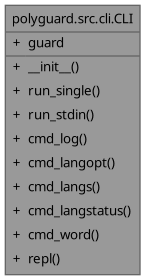
Public Member Functions | |
| __init__ (self, PolyGuard guard) | |
| int | run_single (self, str word) |
| int | run_stdin (self) |
| bool | cmd_log (self, list[str] tokens) |
| bool | cmd_langopt (self, list[str] tokens) |
| bool | cmd_langs (self, list[str] tokens) |
| bool | cmd_langstatus (self, list[str] tokens) |
| bool | cmd_word (self, list[str] tokens) |
| int | repl (self) |
Data Fields | |
| guard = guard | |
Simple CLI class for PolyGuard interactive and batch usage.

Kept at module level to allow import and unit testing.
| bool polyguard.src.cli.CLI.cmd_langopt | ( | self, | |
| list[str] | tokens ) |
Enable or disable a specific language in the PolyGuard configuration.

Parses language code from tokens[1] and 'on'/'off' status from tokens[2],
then updates the guard's language configuration.

Args:
    tokens: Command tokens where tokens[1] is language and tokens[2]
        is 'on' or 'off'.

Returns:
    bool: Always returns True (command processed).
| bool polyguard.src.cli.CLI.cmd_langs | ( | self, | |
| list[str] | tokens ) |
List all available languages in the database with word counts.

Displays languages compactly on lines of ~80 characters, marking
enabled languages with [enabled] tag.

Args:
    tokens: Command tokens (not used).

Returns:
    bool: Always returns True (command processed).
| bool polyguard.src.cli.CLI.cmd_langstatus | ( | self, | |
| list[str] | tokens ) |
Display the current enabled/disabled status of all languages.

Lists each language code with its current 'on' or 'off' status as
determined by the guard's default language configuration.

Args:
    tokens: Command tokens (not used).

Returns:
    bool: Always returns True (command processed).
| bool polyguard.src.cli.CLI.cmd_log | ( | self, | |
| list[str] | tokens ) |
| bool polyguard.src.cli.CLI.cmd_word | ( | self, | |
| list[str] | tokens ) |
Check a word, optionally for a specific language.

Supports multi-word phrases. If the final token matches a known language,
it is treated as the language filter. Returns the match status and any
matched words from the database (if a specific language is given).

Args:
    tokens: Command tokens where tokens[1:] is the word/phrase and
        tokens[-1] may be a language code.

Returns:
    bool: Always returns True (command processed).
| int polyguard.src.cli.CLI.repl | ( | self | ) |
Run the interactive CLI REPL loop.

Accepts user input for words to check or colon-prefixed commands.
Supports batch processing from stdin and interactive commands like
':log', ':langopt', ':langs', ':langstatus', ':word', ':help', ':man'.

Returns:
    int: Always returns 0 on normal exit or interrupt.
| int polyguard.src.cli.CLI.run_single | ( | self, | |
| str | word ) |
| int polyguard.src.cli.CLI.run_stdin | ( | self | ) |
 1.12.0